Home » Custom Printing

Checklist for Customer-Furnished Files

  • Marathon considers a file-furnished job to be any digital file submitted with the intent to be printed as is with no additional design work. If submitting an idea for your custom job, please communicate to your account representative that the file will require additional design work and is not to be considered file-furnished.
  • Check to see that page dimensions are correct. Page dimensions should be the final trim size with bleeds. Bleeds extend into the area that will be trimmed in the binding process, allowing your background or pictures to bleed off the page. Make sure you have a bleed of at least 1/8" past the edge of the trim marks.
  • Be sure all images are correctly positioned in picture boxes.
  • Check the status of all imported images and make sure no images are embedded.æ Image formats accepted are TIFF, EPS or Photoshop layered files.
  • Check to see that all the color builds are correct.æ Make sure all necessary files have been included: Images in TIFF or EPS format (PSD files with layers should be included. This allows easier changes to be made when necessary) / Fonts-printer and screen / Copy of original page layout files / Hard copy-black and white and color.
  • Be sure to label your disks clearly and provide us with the following information to avoid production delays:
    • File name to be printed
    • File type (i.e. InDesign, Quark, PageMaker), Mac or PC
    • Colors (i.e. process, process & spot)
    • Number of pages
    • Hard Copy (include a black-and-white hard copy of all pages. Color jobs must have a color hard copy.
      Furnished files that do not include a color hard copy will be printed as is, without corrections made.)
    • Size of finished piece
Marathon Press can accept the following file types:

MAC:
InDesign
Quark
Pagemaker
Photoshop
Illustrator
Freehand
Acrobat PDF

PC:
Quark
PageMaker
CorelDraw
Photoshop
Acrobat PDF
Customer-furnished files can be accepted on the following:
MAC & PC:
ZIP Disk 100 & 250mb
Jaz 1 Gb & 2 Gb
CD
DVD ± R/RW
Internet File Transfer:
Use our online asset management site for fast, convenient file delivery.
Call your account representative for details.
Marathon is unable to accept e-mail attachments 5mb or larger.

If you wish to send your files via the Internet, please contact an account representative at (800) 228-0629.

Color

Your computer monitor is capable of displaying many more colors than CMYK printing can reproduce. This mismatch between RGB and CMYK can be minimized through color management. This can be as simple as changing some settings on your monitor or as elaborate as installing color management software. More detailed information on color management can be found by consulting your monitor manual and image-editing program manual.

Resolution

Color and grayscale images should be scanned at 400 ppi. Line art should be scanned at 600-800 ppi.

Fonts

Some page layout programs and many prepress service providers and printers cannot produce acceptable results if you use TrueType or specialized fonts. We recommend PostScript Type I fonts for the best output results. When sending a file, be sure to include your screen and printer fonts.

PDF

When creating a PDF to be printed, be sure to use the "Press Optimized" job option and embed all fonts. Registration marks and bleeds are also needed. Marathon cannot edit PDF files.

Preflighting

Upon receipt of your digital files, Marathon will preflight the job. Your account representative will notify you if problems are found during the preflight process. If additional work is required to correct the problem, composition charges may apply.

PostalRegulationsfor Card Backs:

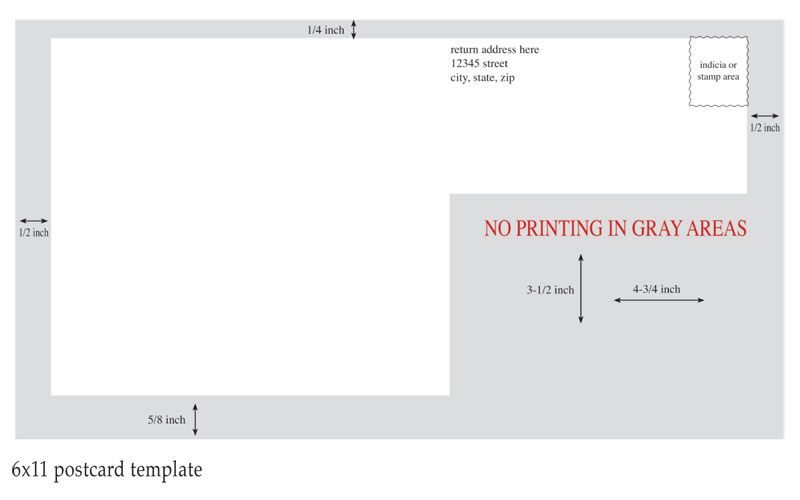
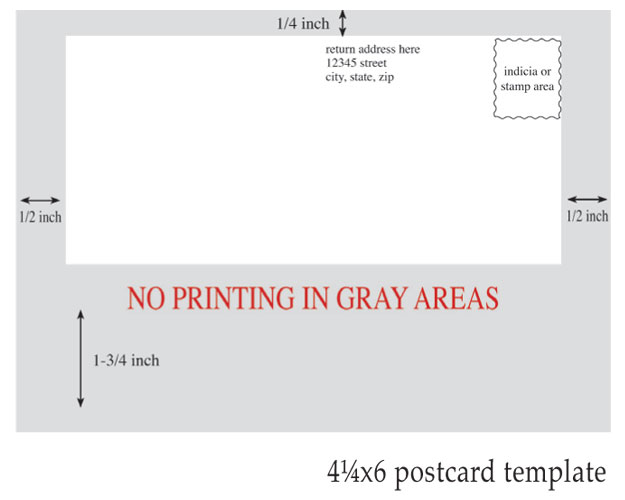
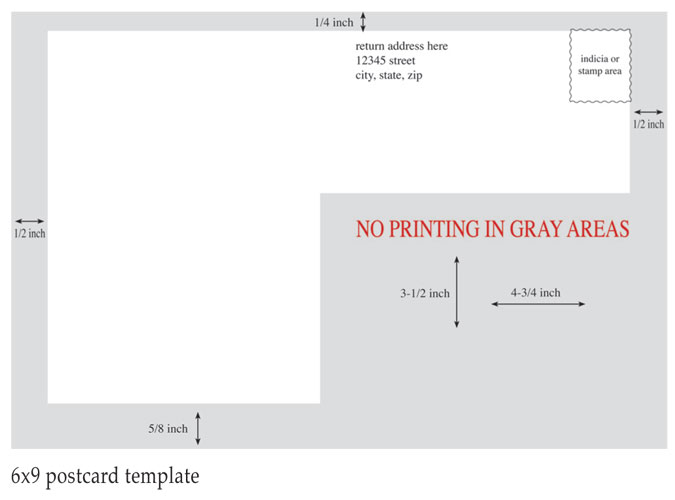
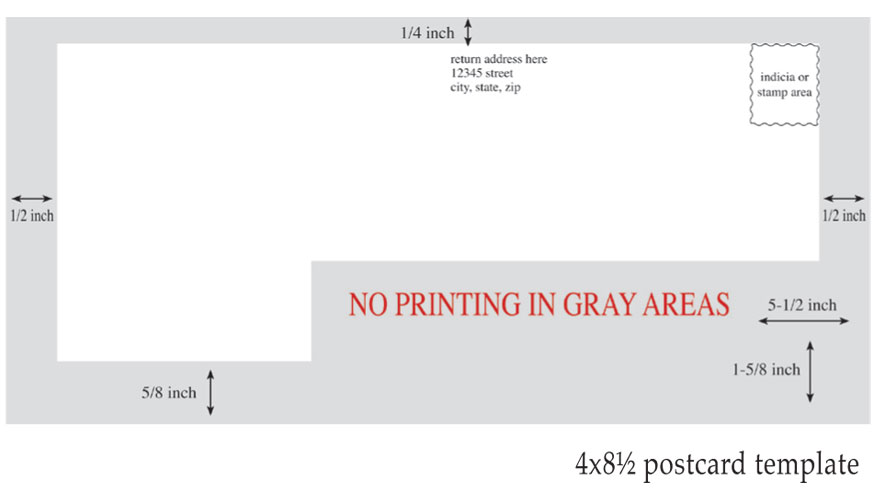
To ensure timely delivery of your marketing pieces, we suggest you use the following templates for the design of your file-furnished card backs. Marathon does not accept responsibility for rejected mailings due to copy that did not follow these templates.

Following these specifications while preparing files can greatly reduce problems and costly production delays.

For more information please contact your account representative at (800) 228-0629.